
Parts of a Box Cutter: What Each Component Does
2026-09-03
Knowing the names and roles of box-cutter components helps a professional user diagnose a problem without guessing. It also makes training conversations clearer: a blade issue, a slider issue, and a housing issue require different responses. This guide explains the common parts found on utility cutters and the way they work together during safe, repeatable cutting.
Why Component Names Matter in Daily Use
A box cutter seems very simple. This is because most internal parts are hidden. However, the visible controls change blade stability. They also control cutting depth and storage safety. Calling every issue a “bad knife” causes mistakes. A dull edge might just need a fresh blade segment. On the other hand, a loose slider requires a completely different choice. A cracked housing means you must replace the tool entirely.
The terminology is especially useful in warehouses, converters, display assembly, and trade work where several people use similar tools. Clear names let supervisors, distributors, and end users describe a fault consistently and decide whether a cutter can be cleaned, re-bladed, or removed from service.
The Main Parts of a Box Cutter
|
Component |
What it does |
What to check |
|
Blade |
Creates the cut along its exposed edge. |
Look for a chipped tip, adhesive buildup, or a worn segment. |
|
Blade channel |
Guides the blade in and out of the housing. |
Keep it free of fibers and residue that can cause drag. |
|
Slider |
Moves the blade and, on many models, engages the lock. |
Confirm that motion is smooth and positions hold. |
|
Housing or handle |
Provides the grip and protects the internal path. |
Inspect for cracks, distortion, or loose halves. |
|
Blade stop or retainer |
Helps keep the blade located in its intended path. |
Check for a secure, normal fit before cutting. |
|
End cap or snapper |
May close the rear opening or support snapping a scored segment. |
Use only as intended and keep fragments controlled. |
O parts of a box cutter work as a system, so the visible symptom is not always the source of the problem. For example, a blade that appears to wobble may be worn, incorrectly seated, or moving in a channel with compacted debris. Inspection should proceed from the exposed blade back toward the handle.
How the Blade and Slider Work Together
The slider is the user’s control point, while the channel keeps the blade moving along a defined line. On a self-locking cutter, the chosen extension position is held so the blade does not drift during a normal cut. The user should still extend only the length needed for the material, because extra exposure increases flex and creates more opportunity for unintended contact.
A blade with scored segments adds another element to the system. When the leading segment becomes dull or damaged, a designated snapping feature may be used to remove only that segment. The broken piece is still a sharp waste item, so it should be contained rather than left on a bench, floor, or carton.
Blade Extension and Cutting Depth
Blade extension should match the thickness of the material and the cutting task. A short, controlled exposure is usually easier to guide than a fully extended blade. That relationship is mechanical as well as practical: more exposed blade can flex more easily, while unnecessary exposure increases the area that can contact a hand or nearby surface.
*Retract the blade before checking the channel or housing.
*Inspect the slider before assuming a dull blade is the only problem.
*Use the designated snapper only when the cutter and blade design provide one.
*Stop using a cutter with unreliable locking or a damaged handle.
Retention Features and Their Limits
A retainer, stop, or locking feature supports correct blade positioning, but it does not make a damaged cutter safe. The user should confirm that the blade sits normally and that the slider holds the selected position before beginning a cut. If either check fails, the cutter needs inspection rather than an extra-tight grip.
How a Box Cutter Mechanism Supports Control
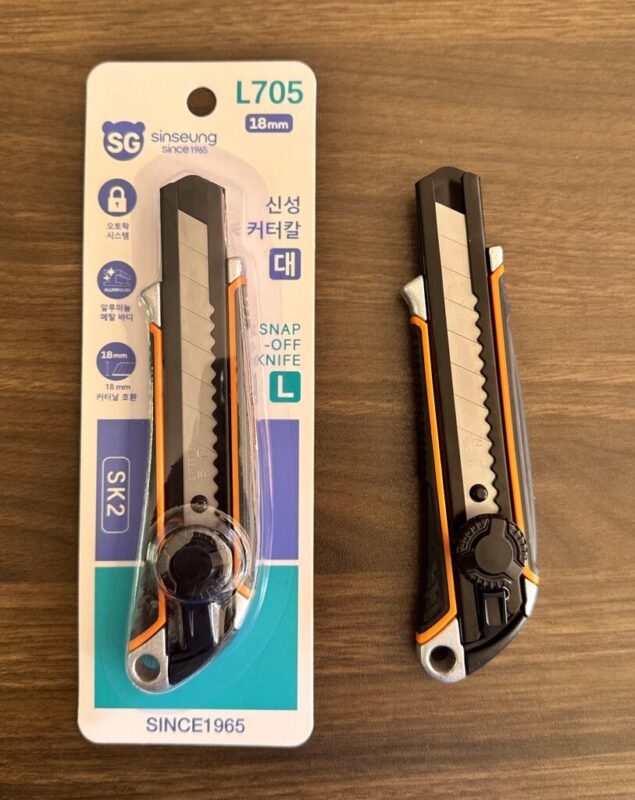
O box cutter mechanism is a compact sequence: the slider moves the blade, the channel guides it, and the housing gives the user a stable place to hold the tool. When each part is clean and sound, the cutter can be extended, used, and retracted in a predictable way. When one part is damaged, forcing the rest of the system usually makes control worse.
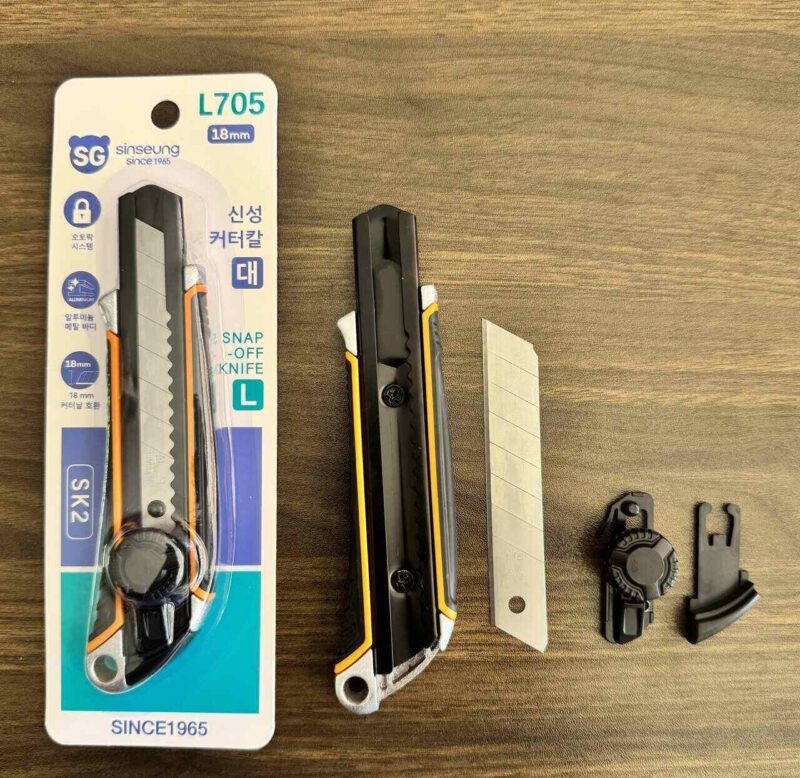
An 18 mm utility cutter such as Sinseung’s L705 offers a familiar full-size example for learning the terminology. The useful lesson is not to memorize one model’s shape; it is to identify the same functional roles across comparable cutters. That makes inspection and safe-use guidance easier to apply without transferring unsupported specifications from one product to another.
People looking for parts of a utility knife should remember that designs vary. Some cutters use a fixed blade, a retractable blade, a snap-off blade, or a different locking arrangement. The safest practice is to identify the component’s role, then follow the intended procedure for that specific tool.
Faults That Should Not Be Treated as Normal Wear
Normal wear includes a dull blade segment and light surface residue. A cracked housing, a slider that will not hold position, a bent blade path, or an unexplained blade wobble is different. Those faults affect control, so the cutter should be set aside until it can be inspected or replaced.
Clear component knowledge prevents a common mistake: using more hand force to compensate for a tool problem. A sharp, stable blade and a sound mechanism reduce the need to push or twist. That is why basic parts knowledge supports both maintenance and safer work habits.
A Practical Parts Check Before the Next Cut
The main lesson is quite simple. You must identify the blade, channel, slider, and housing. Do this before deciding how to fix a tool. Make sure the blade remains in great shape. The slider must move and lock perfectly. The housing must have no cracks. This routine gives professional workers a reliable method. They can discuss tool conditions clearly. They will not treat a broken tool like a simple blade change.
FAQ
What is the metal track inside a box cutter called?
It is commonly called the blade channel. Its job is to guide the blade as it extends and retracts, so it should be kept free of fibers and residue.
What does the slider do on a utility knife?
The slider moves the blade and may engage the knife’s locking positions. If it sticks, slips, or will not hold, stop using the cutter until it is checked.
What is the end piece on a snap-off cutter for?
Depending on the design, the end piece can close the rear opening or act as a blade snapper. It should be used only for the purpose intended by that model.
Why does a box cutter blade wobble?
A wobble can come from a worn blade, incorrect seating, debris in the channel, or a damaged retention feature. Inspect the cutter instead of adding force during the cut.
Are all utility knife parts interchangeable?
No. Blade widths, locking methods, retainers, and housings differ by design. Identify the specific cutter and use compatible parts and procedures for that tool.
-
 Are Box Cutter Blades Universal?Explain box cutter blade compatibility by width, holder channel, lock design, refill format, and model matching for trade buyers.2026/10/01
 -
How to Safely Snap Off a Utility Knife BladeLearn how to snap off a box cutter blade with controlled extension, safe break direction, secure containment, and practical S103 workstation checks.2026/09/24
-
30 vs 45 Degree Cutter Blades for PrecisionLearn how 30 and 45 degree cutter blade tips affect precision, durability, PPF trimming, and wholesale blade selection.2026/09/24