
30° vs 45° vs 60° Blade Angle: How to Choose the Right Blades for Vinyl Wrap & PPF
2026-08-27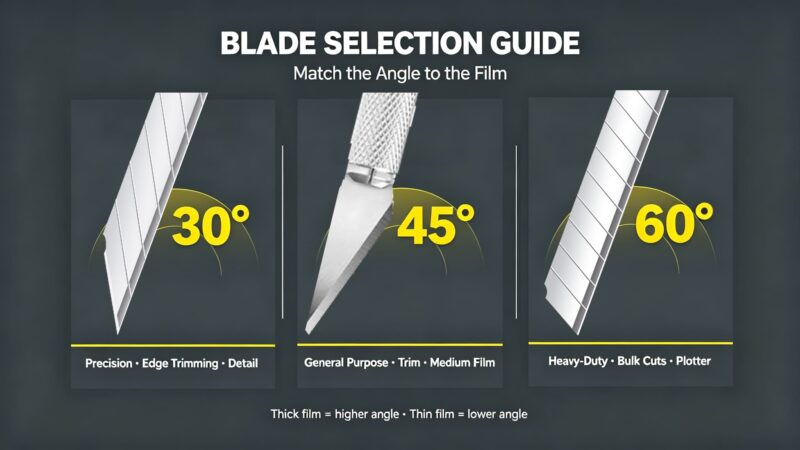
blade selection guide
Why Blade Angle Matters: The Physics of Cutting Film
1.Penetration force — the downward pressure needed to break through the film’s topcoat and adhesive layer
2.Shear resistance — the material’s pushback as the blade slides through it
- A low-angle blade (30°) concentrates force at a tiny point, penetrating with minimal downward pressure. It glides through thin films with almost no drag. But that fine tip is vulnerable — it can chip, bend, or snap if twisted or forced through thick material.
- A high-angle blade (60°) distributes force across a broader cutting edge. It requires more pressure to penetrate, but the reinforced tip powers through thick, tough films without deforming. The trade-off? More drag, more chance of tearing delicate materials, and a wider kerf (cut width).
- A mid-angle blade (45°) sits in the middle — a compromise that works reasonably well for most general-purpose work but excels at nothing specific.
Quick Comparison: 30° vs 45° vs 60° at a Glance
You can quickly view this table:
| Características | 30° Blade | 45° Blade | 60° Blade |
|---|---|---|---|
| Ideal Film Thickness | 30–150μm (1.2–6 mil) | 80–200μm (3–8 mil) | 150μm+ (6 mil+) |
| Penetration Force | Very low | Moderado | Alto |
| Edge Finish | Ultra-clean, hairline | Clean, slight kerf | Wide kerf, aggressive |
| Longividad de la hoja | Shortest (fine tip dulls fast) | Moderado | Longest (reinforced tip) |
| Mejor para | Detail trimming, tint, edges | General vinyl, fleet wraps | Thick PPF, plotter cutting |
| Risk of Tearing | Low on thin film; high on thick | Low on medium film | High on thin film |
| Hand Fatigue | Mínimo | Moderado | High (full-day use) |
| Kerf Width | Narrowest | Medio | Widest |
window tint blade
How to Choose by Film Type
Paint Protection Film (PPF)
- Bulk cutting / plotter: 60° blade
- Edge trimming / final detail: 30° blade
- General installation (medium PPF): 45° blade as backup
Vinyl Wrap (Color Change)
- Cast vinyl (high-end): 30° for detail, 45° for general trimming
- Calendered vinyl (commercial): 45° is sufficient for most work
- Chrome / metallic / textured films: 30° to avoid tearing the fragile top layer
Window Tint
- Standard dyed film: 30° or 45°
- Ceramic / carbon film (thicker): 45°
- Edge trimming on rear glass: 30° for precision around defroster lines
Architectural & Signage Film
- Standard vinyl graphics: 45°
- Thick laminates: 60°
- Fine detail decals: 30°
3 Common Blade Angle Mistakes (and How to Avoid Them)
Mistake 1: Using a 30° Blade on Thick PPF
This is the most common error — and the most expensive. A 30° tip will deform or snap when forced through 200μm+ self-healing PPF. A broken blade tip can scratch the paint underneath, ruining an entire panel. Always use 60° for initial PPF cuts.
Mistake 2: Using a 60° Blade for Detail Work
A 60° blade’s wide tip makes it impossible to follow tight curves. Installers who try to trim around emblems with a 60° knife end up with wavy edges and overcuts. Switch to 30° for any cut within 5cm of a body line or emblem.
Mistake 3: Assuming “Sharper Angle = Better Cut”
A 30° blade is not universally “better” than a 60°. It’s better for specific tasks. Using the finest blade available for every cut is like using a razor blade to chop wood — technically it cuts, but you’ll destroy the tool and get a poor result. Match the angle to the material, not your ego.
Conclusión
Blade angle is not magic — it is material science. The right angle reduces hand fatigue, produces cleaner cuts, extends blade life, and prevents costly mistakes. The wrong angle turns a straightforward installation into a battle with the film.
Here is your takeaway:
- 30° = precision, detail, thin films, clean edges
- 45° = general purpose, medium films, safe default
- 60 ° = power, thick PPF, deep cuts, durability
Professional installers do not choose one angle and stick with it. They build a system — 30° for finishing, 45° for general work, 60° for heavy cutting — and swap knives as the job demands. That is the difference between an okay installer and a great one.
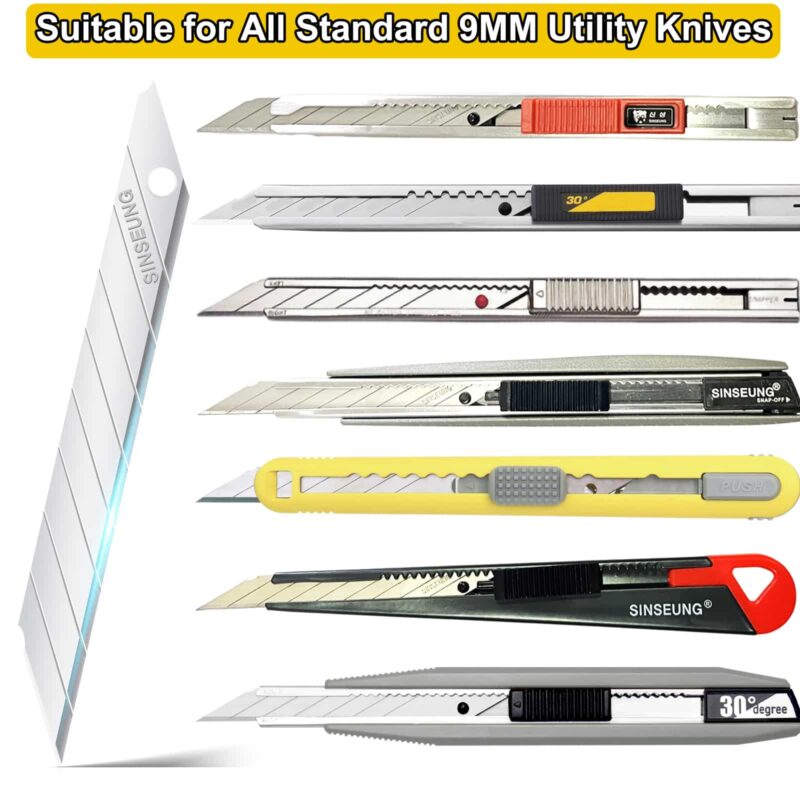
30 degree cutter blades
Preguntas frecuentes
Q: Can I use a 30° blade for PPF?
A: Yes — but only for detail and edge trimming. For bulk cutting of PPF (especially 150μm+ self-healing films), use a 60° blade. Using 30° for thick PPF will deform the tip and risk blade breakage.
Q: Why do plotter machines use 60° blades for PPF?
A: Plotter blades need to penetrate thick PPF topcoats in a single, controlled pass at high speed. A 60° blade is reinforced tip maintains consistent cutting depth through the film’s adhesive layer and release liner, while a 30° tip would deflect or dull under the machine’s consistent downward pressure.
Q: How often should I change my blade?
A: As a general rule: change a 30° blade after every 2–3 meters of PPF edge trimming, a 45° blade after 5–8 meters of general vinyl, and a 60° blade after 10–15 meters of thick PPF. If you notice increased cutting resistance, ragged edges, or the film tearing, change it immediately — a dull blade causes more damage than a new one.
Q: Does blade angle affect how long the blade stays sharp?
A: Yes. Lower angles (30°) have thinner tips that dull faster because there is less material at the cutting edge. Higher angles (60°) have more material behind the edge, so they maintain sharpness longer — but require more force to cut. This is why 60° blades are preferred for high-volume, thick-film work where blade changes would otherwise be frequent.
Q: Are 30° blades more dangerous?
A: Not inherently, but the ultra-sharp tip can cause deeper cuts if mishandled. Always use a knife with a secure locking mechanism, retract the blade when not in use, and cut away from your body. The increased sharpness of a 30° blade actually makes it safer for controlled cutting — it requires less force, reducing the chance of the blade slipping.
This article was written by the SINSEUNG Tool Engineering Team. SINSEUNG has manufactured professional-grade blades and cutting tools for the automotive wrapping, construction, and horticultural industries since 1965. For OEM/ODM inquiries, [contact our global sales team].
-
 SK2 vs SK5 Utility Blades for Different JobsCompare SK2 and SK5 utility blade grades by sharpness, toughness, edge life, and job fit for wholesale blade selection.2026/10/07
 -
Are Box Cutter Blades Universal?Explain box cutter blade compatibility by width, holder channel, lock design, refill format, and model matching for trade buyers.2026/10/01
-
How to Safely Snap Off a Utility Knife BladeLearn how to snap off a box cutter blade with controlled extension, safe break direction, secure containment, and practical S103 workstation checks.2026/09/24